Description
Recover Abandoned WooCommerce Carts & Win Back Lost Sales
Don’t let abandoned carts turn into lost revenue.
PO Abandoned Cart for WooCommerce is a complete WooCommerce abandoned cart recovery plugin that helps store owners automatically follow up with customers who leave their shopping carts without completing checkout.
Once configured, the plugin tracks eligible abandoned carts and automatically sends personalized recovery emails based on the rules you create. Customers can click a secure recovery link to restore their exact cart and continue checkout without having to rebuild their order.
The plugin also goes beyond traditional abandoned cart recovery by allowing you to follow up with unpaid pending WooCommerce orders, giving you another opportunity to recover otherwise lost sales.
Everything is managed directly from your familiar WordPress and WooCommerce dashboard.
Turn Abandoned Carts Into Recovered Orders
Customers abandon carts for many reasons they get distracted, compare prices, encounter payment issues, or simply aren’t ready to purchase.
Instead of losing those potential customers forever, PO Abandoned Cart for WooCommerce gives you multiple opportunities to bring them back.
Create as many recovery email rules as you need and decide when each reminder should be sent.
For example:
- First reminder after 1 hour
- Second reminder after 24 hours
- Third reminder after 72 hours
Each recovery email can have its own subject and is automatically sent according to your configured schedule.
Powerful WooCommerce Cart Recovery Features
Automatic Abandoned Cart Tracking
Automatically track abandoned carts when customers enter their email address during checkout.
The plugin supports both:
- Guest customers
- Logged-in customers
This allows you to recover carts without requiring customers to create an account.
Unlimited Recovery Email Rules
Create as many automated recovery email rules as your store needs.
Set a custom delay and subject for every recovery email to create a multi-step WooCommerce cart recovery campaign.
Detailed Recovery Emails
Recovery emails aren’t just generic reminders.
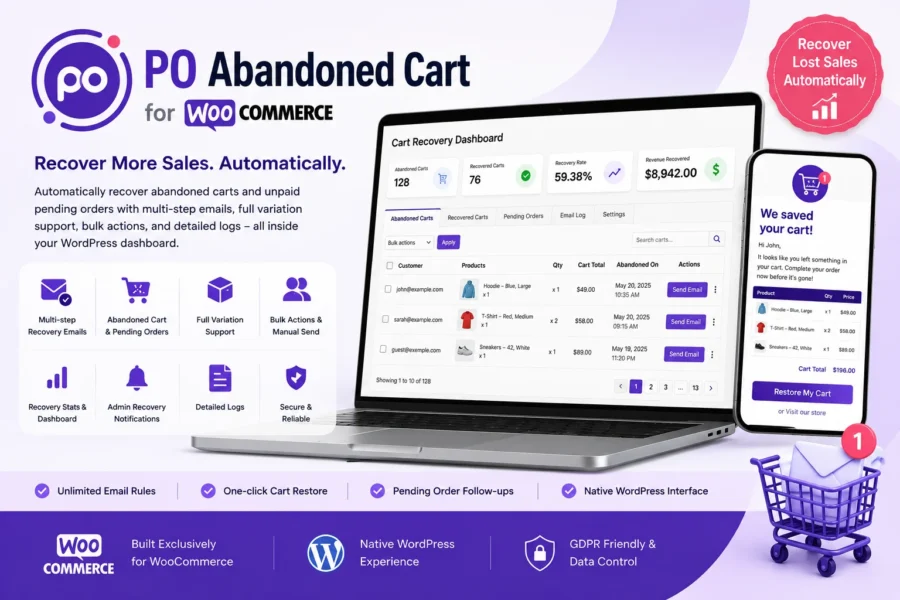
Each email can display the customer’s abandoned cart with:
- Product name
- Product variation
- Quantity
- Product price
- Line subtotal
- Cart total
- Cart recovery button
Customers can clearly see what they left behind and return directly to their cart.
One-Click Cart Restoration
Every recovery email contains a secure cart recovery link.
When the customer clicks the link, their abandoned cart is restored with the products, variations, and quantities they originally selected.
They can then continue directly toward checkout.
Full Variable Product Support
Selling products with options such as:
- Size
- Color
- Material
- Style
- Other WooCommerce variations
No problem.
The selected product variation is captured and displayed correctly in the admin dashboard and recovery emails.
Recover Unpaid Pending Orders
Cart abandonment isn’t the only reason you can lose a sale.
Customers may also create an order but leave it in Pending Payment status.
PO Abandoned Cart for WooCommerce includes a dedicated Pending Orders section that lets you follow up with customers whose orders are still awaiting payment.
You can configure follow-ups and also send emails manually or in bulk.
Manual & Bulk Recovery Emails
Don’t want to wait for an automated email rule?
You can manually send a recovery email whenever needed.
Select individual abandoned carts or multiple carts and use the bulk action to send recovery emails directly from your WordPress dashboard.
The same approach is available for pending order follow-ups.
Recovery Notifications
Know when your recovery efforts result in a sale.
Enable admin recovery notifications to receive an email when an abandoned cart is successfully converted into a completed order.
Notifications can include relevant order and product details.
Recovered Cart History
Keep track of your successful recoveries.
The Recovered Carts section provides a searchable and paginated history of converted abandoned carts, including their associated orders and recovered value.
This makes it easier to monitor your recovery performance over time.
Complete Email Logs
Every recovery email sent through the plugin is recorded.
The Email Log can help you keep track of emails that were:
- Automatically sent
- Manually sent
- Sent through bulk actions
You can search, review, paginate, and clean up old records when needed.
Recovery Rate Dashboard
Get a quick overview of your recovery performance.
The dashboard helps you see:
- Abandoned carts
- Recovered carts
- Recovery rate
- Total recovered revenue
This gives you a simple way to understand how much revenue your cart recovery efforts are bringing back.
Native WordPress Dashboard Interface
The plugin uses familiar WordPress list table interfaces throughout the dashboard.
Manage your:
- Abandoned Carts
- Recovered Carts
- Pending Orders
- Email Logs
with built-in search, pagination, and bulk actions.
No complicated external dashboard is required.
Email Exclusion List
Need to prevent certain email addresses from receiving recovery emails?
Add specific email addresses to the exclusion list.
This is especially useful for:
- Store owners
- Developers
- Testing accounts
- Internal users
Configurable Data Retention
Keep your database organized with configurable data retention.
Automatically remove older abandoned cart records after the number of days you specify.
You can also optionally enable the full data cleanup option if you want plugin data removed when the plugin is uninstalled.
How WooCommerce Abandoned Cart Recovery Works
Step 1 — Customer Adds Products
A customer adds products to their WooCommerce cart and starts the checkout process.
Step 2 — Customer Enters Their Email
Once the customer provides their email address during checkout, the plugin can track the cart for recovery.
Step 3 — Customer Leaves Without Purchasing
If the customer doesn’t complete the checkout, the cart can be identified as abandoned.
Step 4 — Recovery Emails Are Sent
Your configured email rules automatically send recovery reminders based on the delays you set.
Step 5 — Customer Restores Their Cart
The customer clicks the recovery link in the email.
Their original cart is restored with the selected products, quantities, and variations.
Step 6 — Customer Completes Checkout
The customer returns to checkout and can complete the purchase.
Once the sale is recovered, it appears in your recovered cart history and can contribute to your recovery statistics.
Why Use PO Abandoned Cart for WooCommerce?
Recovering an abandoned cart is often much easier than finding a completely new customer.
PO Abandoned Cart for WooCommerce helps your store:
- Reduce lost sales from abandoned carts
- Automatically follow up with potential customers
- Recover unpaid pending orders
- Bring customers back with personalized cart details
- Save time with automated email rules
- Track recovered revenue
- Manage recovery activity from one dashboard
Instead of manually checking abandoned carts and contacting customers one by one, let your WooCommerce store handle the follow-up automatically.
Perfect for WooCommerce Stores
PO Abandoned Cart for WooCommerce is suitable for stores selling:
- Fashion & clothing
- Electronics
- Accessories
- Beauty products
- Home & kitchen products
- Digital products
- Variable products
- Subscription-related products
- And many other WooCommerce products
It is especially useful for stores that want to recover both abandoned shopping carts and unpaid pending orders.
Frequently Asked Questions
Does the plugin track guest customers?
Yes. PO Abandoned Cart for WooCommerce supports both guest and logged-in customers. A guest customer’s cart can be tracked once they enter their email address during checkout.
Does it support WooCommerce variable products?
Yes. Product variations such as size and color are supported. The selected variation is captured and displayed correctly in the dashboard and recovery emails.
How many recovery emails can I send?
You can create unlimited recovery email rules, with each rule having its own delay and subject line.
Can I send a recovery email manually?
Yes. You can send a recovery email manually to an individual abandoned cart or select multiple carts and send emails using bulk actions.
Can I recover unpaid WooCommerce orders?
Yes. The plugin includes a dedicated Pending Orders feature for following up with orders that are still awaiting payment.
Can I send pending order follow-ups in bulk?
Yes. You can select multiple pending orders and use the bulk action to send follow-up emails.
Will I receive a notification when a cart is recovered?
Yes. You can enable admin recovery notifications to receive an email when an abandoned cart converts into a completed order.
Can I exclude specific email addresses?
Yes. You can add specific email addresses to the exclusion list so they don’t receive recovery emails.
Does the recovery link require the customer to log in?
No. The recovery link uses a unique, randomly generated identifier that allows the customer’s specific cart to be restored without requiring them to log in.
Why might a recovery email be delayed?
WordPress background tasks depend on site activity. On very low-traffic websites, scheduled tasks can occasionally run later than expected. For more reliable timing, you can configure a server-side cron job as recommended in the plugin settings.
What happens to plugin data when I uninstall the plugin?
By default, plugin data is preserved when the plugin is deleted, allowing you to reinstall the plugin later without automatically removing the stored data.
If you want a complete cleanup, you can enable Delete all plugin data on uninstall in the plugin settings before uninstalling it.
Get More From Your WooCommerce Store
Every abandoned cart represents a potential customer who was already interested in your products.
With PO Abandoned Cart for WooCommerce, you can automatically follow up with those customers, restore their carts, recover unpaid orders, and monitor the revenue generated through your recovery campaigns.
Start recovering more WooCommerce sales today.