Description
WooCommerce Product Dropdown for Contact Form 7
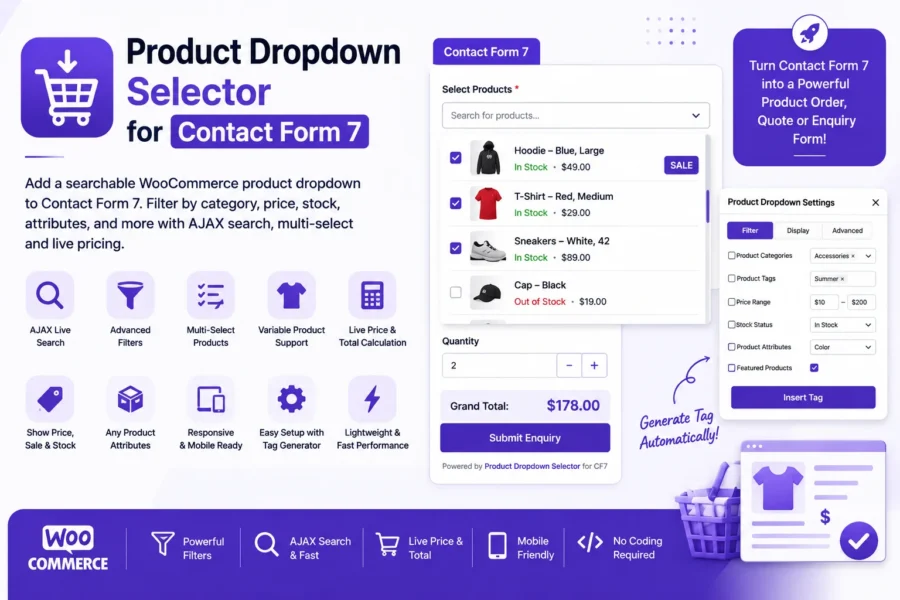
WooCommerce Product Dropdown for Contact Form 7 lets you add a searchable WooCommerce product selector directly to your Contact Form 7 forms and with the Pro version, to your WPForms forms as well. Create product order forms, enquiry forms, quote request forms, and product selection forms without writing custom code.
This plugin connects your forms directly to your WooCommerce product catalog, letting visitors search, filter, and select one or more products from a live dropdown right inside the form they’re already filling out.
No custom coding is required. Configure the field using the built-in Product Dropdown tag generator, choose the filters and options you need, and insert the generated tag into your Contact Form 7 form. If you use WPForms instead, the Pro version adds the same Product Dropdown as a native WPForms field, built the same visual way.
Powerful WooCommerce Product Selection
Add a Contact Form 7 product dropdown to your forms and let visitors search, filter, and select products directly from your WooCommerce catalog.
The plugin supports:
- Single or multiple product selection
- Simple WooCommerce products
- Variable products, with individual variations listed as their own options
- AJAX-powered product search
- Product images, titles and prices
- Product stock information, including a clear Out of Stock label
- Sale badges
- Custom placeholder text
- Quantity selection
- Automatic live grand total calculation
For variable products, individual variations can be displayed as selectable options, so customers to choose combinations such as size and color without any extra setup.
AJAX-Powered Product Search
Have a large WooCommerce catalog?
The AJAX search option lets products load as visitors type instead of preloading your entire catalog.
This makes the product selection experience more practical for stores with large numbers of products.
Visitors can search for the products they need and see matching results directly inside the dropdown.
Combine Multiple Product Filters
Create highly targeted product selectors by combining multiple filters in a single field.
You can filter products by:
- Product Category
- Product Tag
- Minimum Price
- Maximum Price
- Stock Status
- Featured Products
- Best-Selling Products
- WooCommerce Product Attributes
WooCommerce attributes such as Color, Size, Brand, Material, and custom attributes can be detected automatically.
For example, you can create a selector that displays only:
Shoes + In Stock + $20–$99
You can also select multiple terms within supported filters.
Simple or Searchable Dropdown Layout
Choose the layout that works best for your form.
Classic Dropdown – a traditional, simple product selection experience.
Select2 Dropdown – a searchable layout with product images, titles, prices, and sale badges built right into the results list.
The plugin is fully responsive and works across screen sizes.
Quantity & Live Total Price
Need more than product selection? Enable the built-in quantity option so customers can specify how many of each product they want, with the grand total price calculated automatically and in real time as they change products or quantities. This turns Contact Form 7 (or WPForms, with Pro) into a lightweight:
- WooCommerce order forms
- Product quote forms
- Product enquiry forms
- Wholesale request forms
- Custom product request forms
Product Sorting & Organization
Make product lists easier to browse with flexible sorting options.
Products can be sorted by:
- Name – A to Z
- Name – Z to A
- Price – Low to High
- Price – High to Low
- Popularity / Best Selling
- Newest First
You can also group products by category using optgroups, making long product lists easier to scan.
Include or Exclude Specific Products
Need precise control? Include or exclude specific WooCommerce Product IDs to build a targeted product selector, on top of any other filters you’ve already set.
Built for Contact Form 7 and WPForms, with Pro + WooCommerce
WooCommerce Product Dropdown for Contact Form 7 gives you a dedicated Product Dropdown tag generator directly inside the Contact Form 7 form editor: configure the field, choose your filters and options, and insert the generated tag.
If your site uses WPForms, the Pro version brings the exact same product-selection power to a native WPForms Product Dropdown field built with the same visual, filter-driven setup, so you’re not stuck choosing one form plugin over the other.
Perfect For
- WooCommerce Product Order Forms – let customers pick products and quantities right in a Contact Form 7 (or WPForms) form.
- Product Enquiry Forms – customers select the products they’re interested in before submitting an enquiry.
- Request a Quote Forms – product-based quote requests with selection and live pricing.
- Wholesale & B2B Requests – customers select multiple products and quantities in one request.
- Event & Catering Requests – product selection for event services, catering items, rentals, or similar.
- Custom Product Configurators – combine products, variations, filters, quantity, and live pricing into one lightweight configurator.
| Feature | Free | Premium |
|---|---|---|
| Form Builder Support | ||
| Contact Form 7 product dropdown field | ✅ | ✅ |
| WPForms product dropdown field | ❌ | ✅ |
| Product Selection | ||
| Single product selection | ✅ | ✅ |
| Multiple product selection | ✅ | ✅ |
| Simple WooCommerce products | ✅ | ✅ |
| Variable products (individual variations listed) | ✅ | ✅ |
| Grouped products auto-excluded from selector | ✅ | ✅ |
| AJAX-powered live product search | ✅ | ✅ |
| Include / exclude specific Product IDs | ✅ | ✅ |
| Filtering | ||
| Filter by category | ✅ | ✅ |
| Filter by tag | ✅ | ✅ |
| Filter by price range | ✅ | ✅ |
| Filter by stock status | ✅ | ✅ |
| Filter by featured products | ✅ | ✅ |
| Filter by best-selling products | ✅ | ✅ |
| Filter by any WooCommerce attribute (color, size, brand, custom) | ✅ | ✅ |
| Combine multiple filters together | ✅ | ✅ |
| Select multiple values within one filter | ✅ | ✅ |
| Sorting & Display | ||
| Sort by name, price, popularity, or newest | ✅ | ✅ |
| Group products by category (optgroups) | ✅ | ✅ |
| Show product price | ✅ | ✅ |
| Automatic “On Sale” badge | ✅ | ✅ |
| Remaining stock quantity display | ✅ | ✅ |
| Out of Stock label | ✅ | ✅ |
| Product image display | ✅ | ✅ |
| Custom placeholder text | ✅ | ✅ |
| Classic Dropdown layout | ✅ | ✅ |
| Searchable Select2 layout | ✅ | ✅ |
| Ordering & Pricing | ||
| Quantity field | ✅ | ✅ |
| Automatic live grand total calculation | ✅ | ✅ |
| Add to Cart — send selection straight to the WooCommerce cart/checkout | ❌ | ✅ |
| Automation | ||
| Conditional Field Display (show/hide other fields by selection) | ❌ | ✅ |
| Filter Presets — save & reuse a filter configuration across forms | ❌ | ✅ |
| General | ||
| Responsive design | ✅ | ✅ |
| Translation-ready | ✅ | ✅ |
| Priority support | ❌ | ✅ |
Easy Setup
Getting started is simple:
- Install and activate Product Dropdown Selector for Contact Form 7.
- Make sure Contact Form 7 and WooCommerce are installed and active.
- Open or create a Contact Form 7 form.
- Click the Product Dropdown button in the form editor.
- Configure your filters, layout and display options.
- Enable features such as multi-select, AJAX search, quantity, total price, sale badges or stock quantity.
- Click Insert Tag.
- Save your form and display it on your website.
No complicated configuration is required.
Why Use Product Dropdown Selector for Contact Form 7?
Standard Contact Form 7 (or WPForms) fields are great for basic information but selecting real products from a WooCommerce catalog needs more than a plain text field or static dropdown. This plugin bridges that gap, pulling your live WooCommerce catalog directly into your forms instead of you manually maintaining a list of product names by hand.
Whether you’re building a product enquiry form, a quote request form, a wholesale request form, an order form, or a fully custom product selector for Contact Form 7 or, with Pro, for WPForms this plugin gives you the tools to build it in minutes.
Requirements
- WordPress 5.0 or higher
- PHP 7.0 or higher
- WooCommerce
- Contact Form 7
Privacy
The plugin does not collect or store personal data.
It operates by reading product data from your own WooCommerce store and displaying that information inside the product dropdown field.

Reviews
There are no reviews yet.