WooCommerce order fulfillment is the process of handling an online purchase from the moment a customer places an order until the product is delivered or made available to them. It includes checking order details, confirming payment, managing inventory, preparing products, arranging shipping, and keeping customers informed.
For online store owners, efficient fulfillment is essential to providing a smooth shopping experience. WooCommerce helps store owners manage orders and inventory, but delays, incorrect products, stock discrepancies, and unclear delivery updates can still lead to customer complaints, refunds, and lost sales.
WooCommerce provides built-in tools to manage orders and product inventory, while store owners can improve their workflow with suitable shipping services, automation, and plugins.
This article explains how WooCommerce order fulfillment works, how to manage orders efficiently, and what you can do to simplify fulfillment as your business grows.
What Is WooCommerce Order Fulfillment?
WooCommerce order fulfillment refers to the activities required to complete a customer’s purchase after an order is placed. Depending on your business model, you may handle these tasks yourself, work with a third-party fulfillment provider, or use a dropshipping supplier.
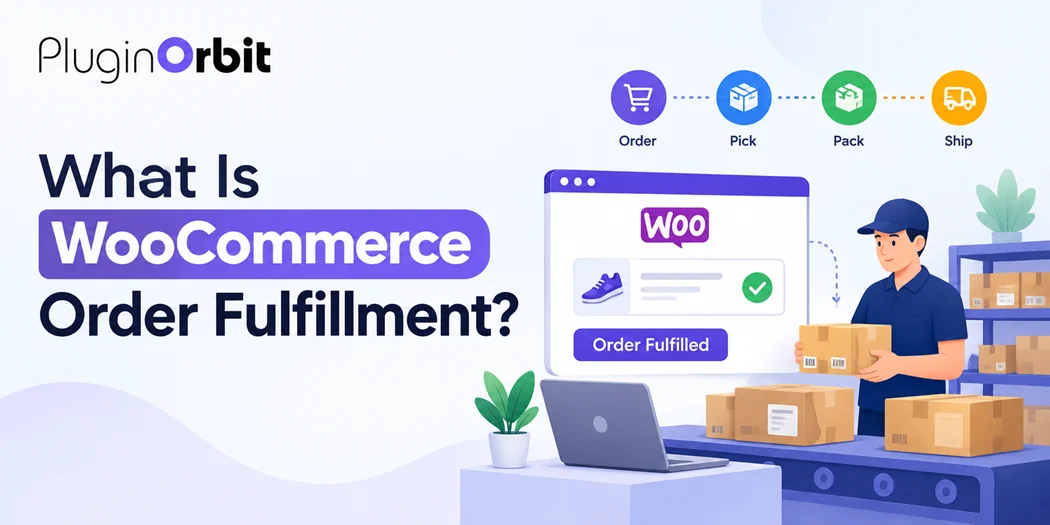
A typical fulfillment process includes:
- Receiving a new order through your WooCommerce store.
- Verifying payment and customer information.
- Checking product availability.
- Picking and packing the purchased items.
- Arranging shipping or delivery.
- Updating the order status and sharing tracking information.
- Handling delivery issues, returns, or refunds when necessary.
For example, imagine a customer purchases a pair of shoes from your online store. After payment is confirmed, you check the available stock, pack the shoes, create a shipping label, and hand the package to a courier. Once the order is dispatched, you update its status and provide the customer with tracking details.
That entire process is part of order fulfillment.
How Does WooCommerce Order Fulfillment Work?
The exact process depends on the products you sell, your payment methods, and your shipping arrangements. However, most physical-product stores follow a similar workflow.
1. Receive and Review the Order
When a customer completes checkout, WooCommerce creates an order containing information such as purchased products, quantities, billing details, shipping address, and payment method.
The store owner or fulfillment team should review the order to identify missing information, unusual quantities, delivery requirements, or other issues that need attention.
For high-volume stores, organizing incoming orders by status or processing priority can help teams identify which orders need action first.
2. Confirm Payment
Before dispatching an order, verify that the payment has been processed or that the order is otherwise authorized for fulfillment under your business’s payment terms.
WooCommerce order statuses can help you understand what action may be needed. For example, an order awaiting payment should not automatically be treated like a paid order ready for shipment.
However, the appropriate next step depends on the payment gateway and transaction status. Some payment methods require additional verification before an order can be released.
3. Check Inventory
Confirm that the ordered products and quantities are available before preparing the package.
WooCommerce includes product stock-management settings that can help track inventory and reduce the risk of accepting orders for unavailable items.
Accurate stock records are particularly important when the same inventory is sold through multiple channels. If a product is out of stock, communicate realistic availability or restocking information instead of promising an unsupported delivery date.
4. Pick and Pack Products
Picking means locating the correct products in your inventory. Packing involves preparing those products for shipment.
A consistent packing process helps prevent incorrect items, missing accessories, damaged products, and avoidable returns.
Consider using clear shelf labels, product identifiers, packing checklists, and appropriate protective packaging. For fragile or high-value items, additional inspection may be worthwhile before sealing the package.
5. Arrange Shipping and Update the Order
Choose a suitable shipping service based on the destination, package size, delivery requirements, and cost.
Depending on your setup, shipping labels and tracking information may be managed manually or through a shipping integration. Once the order has been dispatched, update the order status accurately and share available tracking details with the customer.
Avoid marking an order as completed simply because the package has been prepared. Use statuses that accurately reflect your workflow and the meaning assigned by your store’s configuration.
6. Handle Delivery Issues and Returns
Fulfillment does not always end when a package leaves the warehouse. Customers may report delayed shipments, damaged goods, missing items, or delivery problems.
Create a clear process for investigating these issues, communicating with customers, and arranging replacements or returns where appropriate.
A reliable after-sales process helps customers understand what happens next and reduces unnecessary support requests.
WooCommerce Order Management vs. Order Fulfillment
Although these terms are closely related, they describe different aspects of running an online store.
WooCommerce order management covers the administration of orders throughout their lifecycle. This includes reviewing order details, checking payment status, editing permitted order information, handling cancellations, issuing refunds, and monitoring order progress.
WooCommerce order fulfillment focuses on completing the purchase by preparing the products, arranging delivery, and ensuring the customer receives the order or digital product access.
For example, updating an order’s payment status is part of order management. Picking the purchased product, packing it, and handing it to a courier are fulfillment activities.
Both processes need to work together. Good order management helps your team identify the next action, while efficient fulfillment helps ensure that action is completed correctly.
WooCommerce’s official order-management documentation explains how store administrators can review and manage orders in the dashboard.
How to Manage WooCommerce Orders More Efficiently
As your store grows, handling every order manually can become time-consuming. A few practical improvements can make daily operations easier.
Use Order Statuses Consistently
Establish a clear workflow for orders that are awaiting payment, being processed, completed, cancelled, or refunded.
Train everyone involved in order processing to follow the same procedure. This makes it easier to identify pending tasks and reduces confusion when several team members handle the same order.
Keep Inventory Information Accurate
Review stock levels regularly, investigate discrepancies, and set appropriate low-stock notifications where useful.
If your business sells products through multiple channels, consider how inventory changes in one channel affect availability in another.
Automate Repetitive Tasks
Depending on your setup, automation can help with order notifications, shipping updates, inventory synchronization, and routine administrative tasks.
Choose tools based on the specific problem you need to solve. Before enabling automatic order-status changes or fulfillment actions, test them carefully to avoid dispatching unpaid orders or sending inaccurate notifications.
Improve Customer Communication
Customers want to know whether their order has been received, when it is being prepared, and how they can track delivery.
WooCommerce sends transactional emails for several order events. You can improve these messages by reviewing their wording, adding relevant support information, and making delivery instructions easier to understand.
See our guide on WooCommerce email customization for ways to make order-related communication clearer and more consistent with your brand.
WooCommerce Wholesale Pricing and Bulk Pricing for Large Orders
Wholesale and bulk purchases can add complexity to order fulfillment because a single order may contain dozens or hundreds of units.
WooCommerce wholesale pricing generally refers to special pricing offered to eligible wholesale customers, often based on their customer role, business relationship, or negotiated terms.
WooCommerce bulk pricing typically means offering a lower unit price when customers purchase a larger quantity. For example, a store might charge one price for one unit and a lower price per unit when a customer purchases 50 units.
These pricing approaches can help businesses serve retailers, distributors, and other customers who buy in larger quantities. However, pricing rules and fulfillment capacity need to be considered together.
Before accepting a large order, check:
- Whether enough stock is available to fulfill the requested quantity.
- Whether bulk discounts have been applied correctly.
- Whether the order requires special packaging or palletized shipping.
- Whether the warehouse or supplier can meet the expected dispatch date.
- Whether shipping costs and delivery arrangements have been confirmed.
If prices depend on quantity, customer type, or product specifications, you may also need a wholesale-pricing extension or a quote-based workflow. The right approach depends on how your business sells and processes large orders.
For orders that require custom pricing or additional discussion, our guide to WooCommerce quote request form offers a related approach for collecting customer requirements before confirming a purchase.
Common WooCommerce Order Fulfillment Problems
Even a well-organized store can experience fulfillment issues. Identifying the cause early helps you reduce their impact.
Inventory Errors
Overselling can occur when stock information is inaccurate or updates are delayed. Review inventory regularly and test any integrations that synchronize stock between systems.
Delayed Processing
Orders may remain unprocessed because payment requires verification, products are unavailable, or staff have not been notified.
Use a regular order-review routine and establish clear responsibilities for handling pending orders.
Incorrect or Damaged Products
Picking the wrong variation or using unsuitable packaging can result in returns and customer dissatisfaction.
Use product identifiers, packing checklists, and inspection procedures appropriate to the products you sell.
Missing Tracking Information
Customers may contact support when they cannot determine whether their package has shipped.
Provide tracking details when available, and make sure the order status reflects the actual stage of delivery.
Unclear Customer Emails
Generic or confusing notifications can leave customers uncertain about payment, shipping, or next steps.
Review your transactional emails and make important information easy to find without adding unnecessary promotional content.
Useful Plugins for Improving WooCommerce Operations
WooCommerce already provides core ecommerce functionality, so you do not need a plugin for every task. Add extensions when they address a real operational need.
For example, a shipping integration may help generate labels and synchronize tracking information, while an inventory tool may be useful if your stock is managed across several locations.
You can also review our list of 10 Must-Have WooCommerce Plugins to compare tools for different store-management needs.
For businesses that require customer authorization as part of checkout, Digital Signature for WooCommerce Checkout may help collect a signature before an order is submitted. This can be relevant for custom agreements or purchases that require documented approval, although it is not a shipping or fulfillment automation tool.
Choose plugins according to your store’s requirements, compatibility, support, and ongoing maintenance needs. Too many overlapping extensions can increase complexity and make troubleshooting more difficult.
Best Practices for WooCommerce Order Fulfillment
To keep your fulfillment process organized as order volume increases, follow these practices:
- Document the workflow: Define how orders move from payment confirmation to dispatch and completion.
- Review orders regularly: Identify payment issues, stock shortages, and orders that need special attention.
- Maintain accurate inventory: Reconcile stock levels and investigate discrepancies promptly.
- Set realistic delivery expectations: Account for processing time, supplier availability, and courier estimates.
- Keep customers informed: Send accurate order updates and provide tracking details when available.
- Monitor fulfillment performance: Track processing delays, shipping issues, order errors, and return reasons to identify areas for improvement.
- Test automation: Verify integrations and status changes before relying on them for live orders.
These practices help create a repeatable process without making daily operations unnecessarily complicated.
Conclusion
WooCommerce order fulfillment covers the steps required to complete a customer’s purchase, from reviewing an order and checking inventory to preparing products, arranging delivery, and handling post-purchase issues.
The best way to improve WooCommerce order fulfillment is to maintain accurate inventory, manage orders efficiently, and keep customers informed. You can also use PO Abandoned Cart for WooCommerce to help recover potential sales from customers who leave without completing checkout.
If your store handles wholesale or high-volume purchases, review stock availability, pricing rules, and delivery capacity before accepting large orders. As your business grows, introduce automation or additional plugins where they solve specific problems.
A well-managed fulfillment process helps reduce avoidable errors, keeps customers informed, and gives your WooCommerce store a stronger foundation for growth.