Increasing sales in a WooCommerce store does not always mean finding more customers. Sometimes, the easiest opportunity is to help existing customers discover products that complement what they are already buying.
That is where WooCommerce upsell and cross-sell strategies can help.
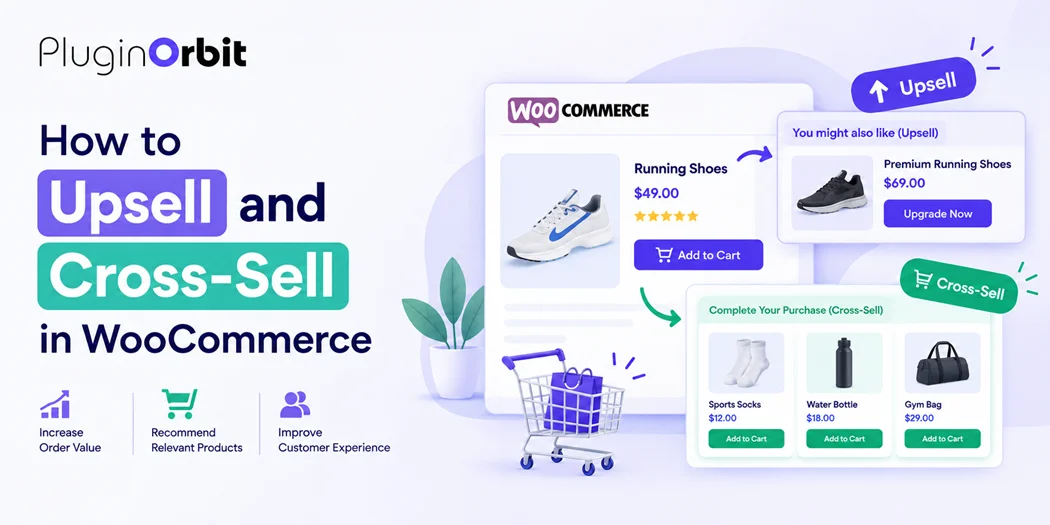
An upsell encourages shoppers to choose a higher-value or upgraded version of a product, while a cross-sell recommends complementary products that go well with their purchase. When these recommendations are relevant and helpful, they can increase your average order value (AOV) while maintaining a smooth shopping experience.
A fast-loading store is equally important, so make sure to Speed Up WooCommerce for better performance.
how WooCommerce upsells and cross-sells work can help you choose the right products, place recommendations effectively, and create a more useful shopping experience for your customers.
What Is an Upsell in WooCommerce?
A WooCommerce upsell is a product recommendation that encourages customers to purchase a better, upgraded, or higher-value alternative to the product they are currently considering.
For example, suppose a customer is looking at a $50 pair of running shoes. You could recommend a $75 pair with better cushioning, improved durability, or additional features.
The goal is not simply to promote a more expensive product. A good upsell should explain why the recommended product provides more value.
Common WooCommerce upsell examples include:
- A premium version of a product
- A larger product size
- A product with additional features
- A higher-quality alternative
- A product bundle with more value
- A premium subscription instead of a basic plan
Effective WooCommerce product upselling focuses on customer needs rather than price alone.
What Is a Cross-Sell in WooCommerce?
A WooCommerce cross-sell recommends products that complement the item a customer is purchasing.
For example, someone buying a laptop may also need a laptop bag, wireless mouse, keyboard, or USB hub.
The recommended products do not replace the original product. Instead, they add value to the purchase.
Examples of WooCommerce cross-sells include:
- Phone + phone case
- Camera + memory card
- Laptop + laptop bag
- Shoes + shoe care products
- Coffee machine + coffee beans
- Fitness equipment + accessories
This is also closely related to WooCommerce related products, but there is an important difference.
Related products can be automatically or manually displayed as products shoppers may also be interested in. Cross-sells are more intentional recommendations designed around the customer’s current purchase.
Upsell vs. Cross-Sell: What’s the Difference?
The easiest way to remember the difference is:
Upsell = upgrade the purchase.
Cross-sell = add to the purchase.
For example:
| Strategy | Customer is buying | Recommendation |
| Upsell | Basic headphones | Premium noise-canceling headphones |
| Cross-sell | Headphones | Protective carrying case |
| Upsell | Standard coffee machine | Premium coffee machine |
| Cross-sell | Coffee machine | Coffee beans |
| Upsell | Basic hosting plan | Business hosting plan |
| Cross-sell | Hosting plan | Website backup service |
Both strategies can increase your store’s average order value, but they work differently.
A strong WooCommerce store can use both instead of relying on only one recommendation method.
Why Use Upsells and Cross-Sells in WooCommerce?
Upselling and cross-selling can help you generate more revenue from customers who are already interested in your products.
1. Increase average order value
If customers add an additional product or choose a higher-value option, the average amount spent per order increases.
2. Help customers discover relevant products
Customers may not know that a complementary product exists. A well-placed recommendation can make the buying process easier.
3. Improve the shopping experience
Relevant recommendations can save customers time by showing products they may genuinely need.
4. Increase product visibility
Cross-selling also gives less-visible products additional exposure by connecting them with popular products.
5. Make existing traffic more valuable
You don’t always need more visitors to generate additional revenue. Improving the value of existing orders can also contribute to store growth.
If you are still learning the basics of WooCommerce, understanding how WooCommerce works can help you make better decisions about your product, cart, checkout, and recommendation strategy.
Where Should You Add WooCommerce Upsells?
Placement matters because recommendations should appear when they are relevant to the customer’s buying decision.
Product pages
Product pages are one of the most natural places for upsells.
For example, if someone is viewing a standard product, you can show a premium alternative with additional features.
You can also improve the presentation of your product recommendations by learning how to customize your WooCommerce product page.
Cart page
The cart is a useful location for cross-sells because the customer has already decided to buy.
For example:
“Complete your order with these accessories.”
This works particularly well for small complementary products.
Checkout
Checkout recommendations should be used carefully. Customers are already close to completing their purchase, so excessive recommendations can create distractions.
If you use checkout offers, keep them highly relevant and easy to understand.
After purchase
Post-purchase emails can also be used to recommend complementary products.
For example, after someone buys a camera, you could send an email recommending a memory card or camera bag.
This is where your WooCommerce emails strategy can support cross-selling beyond the initial transaction.
How to Create Effective WooCommerce Upsells
Simply adding random products to your store is not enough. Your recommendations should have a clear relationship with the customer’s intent.
1. Understand the customer’s needs
Start by asking:
What problem is the customer trying to solve?
If you understand the customer’s goal, you can recommend products that genuinely improve their purchase.
2. Recommend a meaningful upgrade
An upsell should provide a clear benefit.
Instead of:
“Buy this more expensive product.”
Try:
“Upgrade to the premium version for longer battery life and faster charging.”
The second approach gives customers a reason to consider the upgrade.
3. Keep the price difference reasonable
A huge price jump can discourage customers.
If someone is considering a $40 product, recommending a $400 alternative may not make sense unless there is a strong reason for the difference.
4. Focus on relevance
Relevance is more important than showing as many products as possible.
A customer is more likely to respond to three useful recommendations than ten unrelated products.
How to Create Better WooCommerce Cross-Sells
A good cross-sell should feel like a helpful suggestion rather than another sales pitch.
Use complementary products
Think about what customers typically need after purchasing a particular product.
For example:
Product: DSLR camera Cross-sells: Memory card, camera bag, tripod
The connection is obvious, making the recommendation useful.
Create product combinations
Look at your existing orders and identify products customers frequently purchase together.
This can help you build cross-sell recommendations based on real buying behavior rather than assumptions.
Consider bundles
You can also combine complementary products into bundles when it makes sense.
For example:
Camera + memory card + camera bag
A bundle can simplify the buying process and potentially provide a better overall value.
Best Practices for WooCommerce Upselling and Cross-Selling
Keep these principles in mind when creating your recommendation strategy.
Make recommendations relevant
Relevance should always come first. Avoid recommending products simply because they have a high price or large profit margin.
Don’t overwhelm customers
Too many recommendations can create decision fatigue.
Keep your offers focused and easy to understand.
Explain the benefit
Customers need a reason to upgrade or add another product.
Highlight benefits such as:
- Better performance
- More features
- Longer durability
- Convenience
- Compatibility
- Better value
Test different recommendations
There is no universal upsell strategy that works for every store.
Test different products, placements, messaging, and offers to understand what your customers respond to.
Monitor average order value
A successful upselling strategy should ultimately contribute to measurable business results.
Track metrics such as:
- Average order value
- Conversion rate
- Revenue per customer
- Upsell conversion rate
- Cross-sell conversion rate
WooCommerce Plugins for Upselling and Cross-Selling
The default WooCommerce functionality can handle basic product relationships, but some stores may need additional features for more advanced recommendation strategies.
For example, you may want functionality for:
- Conditional product recommendations
- Frequently bought together offers
- Product bundles
- Cart-based recommendations
- One-click upsells
- Personalized offers
- Advanced checkout recommendations
Choosing the right WooCommerce plugins depends on the size of your store, your product catalog, and the type of recommendation experience you want to create.
However, avoid installing multiple plugins that perform overlapping functions. Too many unnecessary plugins can make your store harder to manage and may affect performance.
If performance is becoming a concern, learn how to speed up your WooCommerce store before adding more functionality.
Common WooCommerce Upselling Mistakes to Avoid
Even a good upsell strategy can hurt conversions when implemented poorly.
Recommending irrelevant products
A product recommendation should have a logical connection to the customer’s purchase.
Making every recommendation more expensive
Upselling is not simply about pushing customers toward the highest-priced product.
Sometimes a lower-priced complementary product is a better recommendation.
Adding too many offers
More recommendations do not automatically mean more sales.
Ignoring mobile users
Your product recommendations should work smoothly on mobile devices, where a large portion of online shopping takes place.
Forgetting to test
Don’t assume that a recommendation will work simply because it makes sense to you. Use your store data to evaluate performance.
Final Thoughts
WooCommerce upselling and cross-selling can be powerful ways to increase order value while helping customers discover products that genuinely fit their needs.
The key is relevance.
Use upsells when a better version of a product can provide additional value. Use cross-sells when another product naturally complements the customer’s purchase. Place recommendations at useful points such as product pages, carts, and post-purchase communications.
Most importantly, focus on helping customers make better purchasing decisions rather than showing as many offers as possible.
When your recommendations are useful, well-timed, and relevant, WooCommerce product upselling and cross-selling can become a natural part of the shopping experience rather than an interruption.