A customer adds products to an online shopping cart, proceeds toward checkout, and then leaves without completing the purchase. This happens for many reasons, including unexpected delivery costs, payment concerns, comparison shopping, or simply getting distracted.
For ecommerce businesses, these unfinished purchases create an opportunity to reconnect with shoppers who have already shown interest in their products.
An abandoned cart email sequence helps businesses follow up automatically when shoppers leave products behind. Instead of relying on one reminder, businesses can send a series of relevant emails that address purchase concerns, display selected products, and make returning to checkout easier.
However, sending repeated reminders without a clear strategy can frustrate customers. The timing, message, personalization, and frequency of each email matter.
What Is an Abandoned Cart Email Sequence?
An abandoned cart email sequence is a series of automated messages sent to eligible shoppers who add products to their shopping cart or begin checkout but leave without completing their purchase.
These messages are triggered by customer activity and delivered according to predefined timing and conditions.
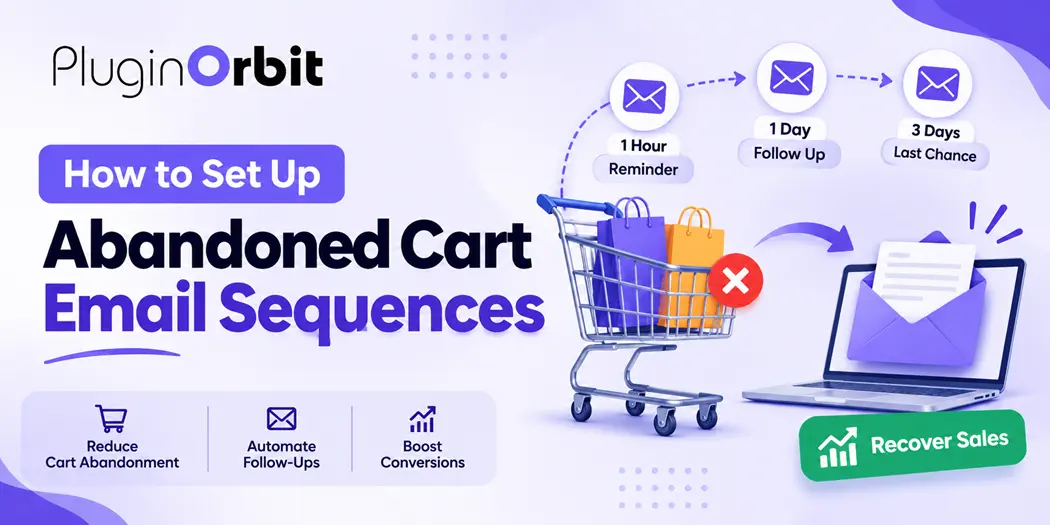
For example, an online store might create a three-email sequence:
- First email: A friendly reminder a few hours after cart abandonment.
- Second email: A follow-up that addresses common purchase concerns.
- Third email: A final reminder with an optional promotional incentive.
Each email should have a different purpose rather than repeating the same message.
An abandoned cart email sequence can be used with WooCommerce, Shopify, and other ecommerce platforms that support cart tracking and email automation.
Why Do Ecommerce Stores Need Abandoned Cart Email Automation?
Not every shopper who leaves a cart has lost interest. Some customers are comparing products, checking delivery options, waiting for a convenient time to purchase, or looking for additional information.
Baymard Institute’s ecommerce checkout research reports an average documented cart abandonment rate of approximately 70%. Its research also identifies checkout usability and unexpected costs among the reasons shoppers leave.
An effective recovery strategy can help businesses:
- Reconnect with interested shoppers: Remind customers about products they previously selected.
- Simplify the purchasing process: Provide a direct link to return to their cart or checkout.
- Address purchase concerns: Share useful information about shipping, returns, payments, and product details.
- Automate follow-ups: Send relevant reminders without manually tracking every unfinished purchase.
- Measure campaign performance: Identify which messages contribute to completed orders.
The objective is to make the next purchase step easier, not simply to send more promotional emails.
How to Set Up an Abandoned Cart Email Sequence
Creating an effective abandoned cart email flow requires a reliable trigger, an appropriate sending schedule, relevant messages, and conditions that prevent unnecessary follow-ups.
Step 1: Choose the Right Cart Abandonment Trigger
Start by deciding which customer activity should trigger your automation.
Two common triggers are:
Added to Cart: A shopper adds a product to their cart but does not complete the purchase.
Started Checkout: A shopper begins the checkout process but leaves before placing an order.
These triggers represent different levels of purchase intent. Someone who has entered their checkout information may be closer to purchasing than someone who has only added a product.
Your ecommerce platform and email marketing integration determine which events are available.
Before activating the sequence, check whether the system can identify the shopper, capture the relevant cart details, and associate the activity with an eligible email address.
Step 2: Create a Three-Email Recovery Schedule
Timing is an important part of abandoned cart email automation. Sending a reminder immediately after someone leaves may interrupt shoppers who are still browsing or completing their purchase.
A practical starting schedule is:
| Suggested timing | Purpose | |
| First reminder | 2–4 hours | Remind shoppers about their products |
| Second reminder | 20–24 hours | Address questions and purchase concerns |
| Final reminder | 48–72 hours | Encourage a final return to checkout |
These intervals are starting points, not fixed rules.
Klaviyo’s abandoned cart flow guidance recommends testing a first reminder around 2–4 hours after checkout begins, followed by another message 20–48 hours later. It also recommends considering product prices and the customer’s buying journey when choosing delays.
For example, someone purchasing an inexpensive accessory may make a decision quickly, while a shopper considering expensive electronics may need more time.
Step 3: Write Different Emails for Each Follow-Up
Each message in your abandoned cart email sequence should address a different customer need.
Sending the same reminder multiple times offers little additional value.
Email 1: Send a friendly cart reminder
The first email should remind customers about their selected products without sounding overly promotional.
Example:
Subject: Still thinking about your selected products?
Hi [First Name],
You recently added a few items to your shopping cart but didn’t finish checking out.
Your selected products may still be waiting for you. If you’re ready to continue, you can return to your cart using the link below.
CTA: Return to Your Cart
Need help before ordering? Feel free to contact our support team.
Email 2: Address questions and purchase concerns
If the customer hasn’t completed the purchase, use the second email to provide useful information.
Subject: Have questions before completing your order?
Hi [First Name],
Still considering your purchase?
If you have questions about product details, shipping, payment methods, or returns, we’re here to help.
You can review your selected products and continue checkout whenever you’re ready.
CTA: Continue Shopping
A helpful follow-up can give customers more confidence without pressuring them to purchase.
Email 3: Send a final follow-up
The final email should provide another opportunity to complete the order.
Subject: One last reminder about your shopping cart
Hi [First Name],
Just a quick reminder that you still have selected products in your shopping cart.
If you would like to complete your purchase, use the link below to return to checkout.
CTA: Complete Your Order
If your business offers a genuine promotion, you can include its details here. Make sure any discount and expiry conditions are accurate.
Step 4: Personalize Automated Cart Recovery Emails
Generic reminders often fail to provide enough context for customers to recognize their unfinished shopping session.
Personalization makes the email more relevant by using available customer and cart information.
Consider including:
- Customer’s first name, when available.
- Product name and image.
- Product price and quantity.
- Cart or checkout recovery link.
- Relevant shipping and return information.
- Customer support contact details.
For example, instead of sending a general message such as “Complete your purchase,” display the actual products the shopper selected.
Use dynamic content where your email platform supports it. This allows product details to change according to each customer’s cart.
Before sending, test personalized links to confirm they return shoppers to the correct products and checkout details.
Step 5: Configure Automation Rules and Conditions in WooCommerce
For WooCommerce store owners, the next step is to configure when recovery emails should be triggered and when the sequence should stop.
A dedicated solution can help manage cart tracking, email templates, sending delays, and recovery reminders.
The Abandoned Cart for WooCommerce plugin is a relevant option for store owners who want to manage automated abandoned cart follow-ups.
When configuring your workflow, consider these conditions:
- Identify when a qualifying cart becomes abandoned.
- Set the delay before sending the first reminder.
- Configure the subject and content of each recovery email.
- Check whether the customer has completed an order.
- Stop remaining reminders after a successful purchase.
- Avoid repeatedly enrolling the same customer within an inappropriate period.
- Exclude recipients who are not eligible to receive the emails.
For example, if a shopper completes an order after receiving the first reminder, the remaining emails should not continue sending.
Your automation should also avoid overlapping with other abandoned cart campaigns running through your email marketing platform.
Step 6: Track Abandoned Carts and Test Your Workflow
Before launching your campaign, confirm that your store is recording abandoned carts correctly.
Review the available cart information, customer details, product data, and recovery status.
You can also use this resource to understand See Abandoned Carts in WooCommerce and monitor unfinished purchases.
Next, test the entire workflow:
- Add a product to a test cart.
- Enter an eligible test email address.
- Leave checkout without placing an order.
- Verify that the cart is recorded.
- Confirm that the first email follows the configured delay.
- Check product images, prices, and recovery links.
- Complete a test purchase and verify that subsequent reminders stop.
Test your emails on mobile and desktop devices before activating the sequence for customers.
Best Practices for an Effective Abandoned Cart Email Flow
A successful email sequence should make the shopping experience easier rather than create unnecessary pressure.
Consider these practices when improving your recovery campaigns.
Use clear subject lines: Customers should understand why they received the message. Avoid misleading promotional language.
Keep the message focused: Display the products customers left behind instead of filling the email with unrelated recommendations.
Make the recovery button visible: Use a clear CTA such as “Return to Your Cart” or “Complete Your Order.”
Avoid unnecessary discounts: Offering an incentive in the first email may encourage customers to wait for future promotions. Test discounts only when they support your business goals.
Maintain consistent branding: Use the same logo, colors, typography, and communication style across your email campaigns. You can also Customize WooCommerce Emails to maintain a consistent communication experience.
Respect customer preferences: Follow applicable email marketing and data protection requirements, including CAN-SPAM for applicable US commercial messages and GDPR requirements where relevant. Check the rules for the markets in which you operate.
How to Measure Abandoned Cart Email Automation Performance
Once your automation is active, monitor its performance rather than assuming that sending more emails will automatically recover more orders.
Focus on these metrics:
| Metric | What it measures |
| Delivery rate | Emails successfully delivered |
| Open rate | Opens recorded by your email platform |
| Click-through rate | Recipients clicking email links |
| Conversion rate | Recipients completing a purchase |
| Recovered revenue | Revenue attributed to recovered orders |
| Unsubscribe rate | Recipients opting out of future emails |
Compare individual messages to understand which parts of your sequence are performing well.
For example, if the first email receives clicks but few completed purchases, investigate shipping costs, payment options, checkout usability, and recovery links.
If the final email produces few additional orders but increases unsubscribes, consider changing its timing or message.
Use A/B testing to compare subject lines, sending delays, email content, and incentives. Measure actual purchases rather than relying only on email opens.
Common Mistakes to Avoid When Setting Up Cart Recovery Emails
Even well-designed automation can create a poor customer experience when important conditions are overlooked.
Avoid these common mistakes:
- Sending too many reminders: Repeated emails can frustrate shoppers and increase unsubscribes.
- Ignoring completed purchases: Check order status before sending subsequent messages.
- Using broken recovery links: Customers should be able to return to the correct shopping session.
- Sending generic messages: Include relevant product details rather than repeating identical reminders.
- Offering discounts too early: Incentives should support conversions without unnecessarily reducing profit.
- Ignoring mobile layouts: Make sure buttons, images, and text display correctly on smaller screens.
- Overlooking email permissions: Ensure that your collection and sending practices comply with applicable requirements.
Also review your checkout experience. A slow or difficult checkout process can discourage customers from completing purchases, so consider ways to Speed Up WooCommerce and reduce unnecessary friction.
Conclusion
An effective abandoned cart email sequence gives ecommerce businesses a structured way to reconnect with shoppers who leave without completing their purchases.
The best approach combines relevant reminders, sensible timing, personalized product information, and automation rules that stop messages after an order is completed.
Start with a simple three-email workflow, test each message, and use completed purchase data to improve your strategy over time.
For WooCommerce store owners, choosing the right WooCommerce Plugins can also help organize store operations and support a more efficient customer experience.
Rather than sending more reminders, focus on sending the right message at the right time and making it easier for customers to complete their purchases.