Description
Add a Digital Signature Field to Contact Form 7
Need a simple way to collect signatures directly from your WordPress forms?
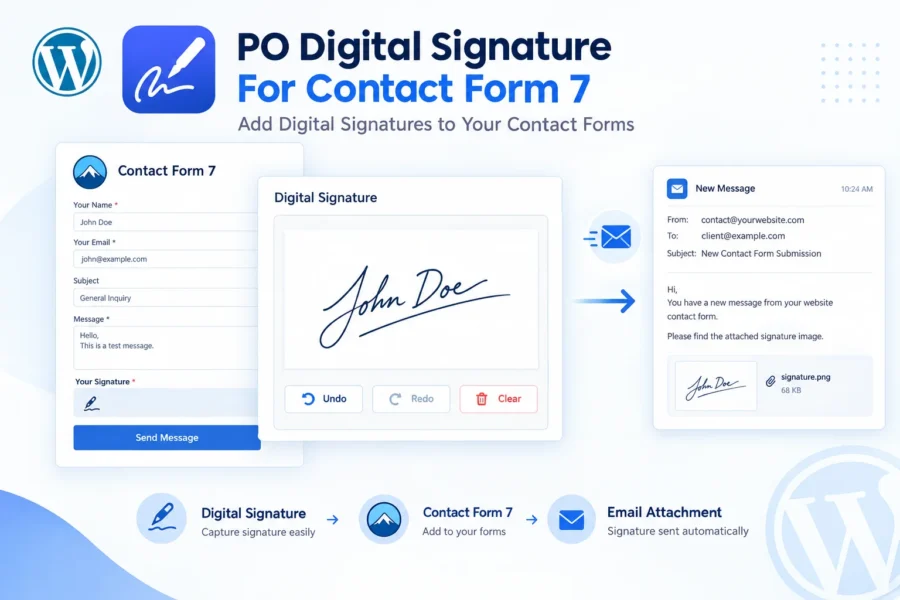
PO Digital Signature For Contact Form 7 is a lightweight Contact Form 7 signature addon that adds a customizable digital signature field to your existing CF7 forms.
Visitors can sign using a mouse, finger, or stylus, or choose to type their name instead. Once the form is submitted, the signature is converted into an image and automatically attached to the Contact Form 7 notification email.
No complicated third-party signing platform is required.
Simply install the plugin, open your Contact Form 7 form, and use the built-in signature tag generator to add your signature field.
A Complete Contact Form 7 Signature Solution
The plugin gives you control over how your signature field looks and behaves. You can customize the canvas dimensions, pen color, pen thickness, background color, toolbar buttons, border style, image format, signature guideline, watermark, and more.
You can also make the signature field required, ensuring that visitors cannot submit the form until they provide a signature.
Use the standard Contact Form 7 syntax:
[signature]
or:
[signature*]
when the signature should be required.
Draw or Type a Signature
Not every visitor wants to draw with a mouse or touchscreen.
With the built-in Type Your Signature Instead option, visitors can enter their name and have it rendered in a cursive signature style on the same signature pad.
This makes the signature field easier to use across desktop, tablet, and mobile devices.
Automatically Receive Signed Forms by Email
When a visitor submits a signed form, the plugin converts the signature into an actual image file and attaches it to the Contact Form 7 notification email.
You don’t need to manually download or convert the signature.
The signature is delivered as a proper attachment alongside your form notification.
Privacy-Conscious Signature Handling
By default, signature files are stored temporarily only for the time required to send the notification email and are then automatically deleted.
No permanent signature storage is enabled by default.
If your workflow requires keeping signatures, you can optionally enable permanent storage in the WordPress Media Library.
Optional Permanent Storage and Audit Trail
For workflows that require a lasting record, the plugin can store submitted signatures in the Media Library.
Stored signatures can include information such as the originating form, field, date, and IP address.
You can also enable an optional audit-trail stamp that adds a small date/time and IP information strip to the signature image.
Signature Gallery & Bulk Export
When permanent storage is enabled, the plugin provides a dedicated signatures gallery where stored signatures can be reviewed and filtered by date.
You can also export filtered signatures in bulk as a ZIP file.
Built for WordPress + Contact Form 7
PO Digital Signature For Contact Form 7 is designed to do one job without unnecessary complexity: capture electronic signatures through Contact Form 7 and deliver them with your form submissions.
It requires Contact Form 7 and works with mouse, touch, and stylus input, making it suitable for both desktop and mobile forms.
Key Features
- Add a digital signature field to Contact Form 7
- Dedicated Contact Form 7 signature tag generator
- Draw signatures using mouse, finger, or stylus
- Type signatures instead of drawing
- Smooth signature drawing powered by SignaturePad.js
- Undo, Redo, and Clear controls
- Required and optional signature fields
- Automatically email signatures as image attachments
- PNG output with transparency support
- JPG output for smaller file sizes
- Custom canvas width and height
- Custom pen color
- Custom pen thickness
- Custom background color
- Alpha-enabled color picker
- Sign-here guideline text
- Custom watermark text
- Toolbar visibility controls
- Solid, shadow, or no border
- Responsive and mobile-friendly signature pad
- Site-wide default signature settings
- Per-field settings override
- Privacy-conscious temporary file handling
- Optional permanent Media Library storage
- Optional audit-trail stamp
- Signatures gallery
- Date-range filtering
- Bulk ZIP export
- Namespaced code to reduce conflicts
- No unnecessary database tables
- No bloated settings interface
The README specifically documents the customizable signature canvas, automatic image attachment, required field support, mobile compatibility, privacy-conscious temporary storage, and typed signature functionality.
Use Cases
Service Agreements
Collect a customer’s signature when submitting service or freelance agreements.
Consent Forms
Add a required signature field to consent forms and liability waivers.
Delivery Confirmations
Allow customers to sign directly on a delivery or pickup confirmation form.
Rental & Lease Forms
Collect signatures for rental agreements, lease-related forms, and acknowledgments.
NDA & Legal Acknowledgment Forms
Add a simple electronic signature field to NDAs and other acknowledgment forms.
Event Registrations
Collect signed waivers during event, workshop, or registration processes.
School & Camp Forms
Use a signature field for permission slips and similar forms.
HR Forms
Collect signatures for onboarding documents and policy acknowledgments.
WordPress Contact Forms
Add a signature field whenever your Contact Form 7 form requires a quick electronic signature.
These use cases are directly aligned with the plugin’s documented “Perfect For” section.
What’s Included
- PO Digital Signature For Contact Form 7 plugin
- Contact Form 7 signature form-tag
[signature]optional signature field[signature*]required signature field- Signature tag generator integration
- Signature drawing interface
- Typed signature mode
- Signature customization options
- Signature email attachment functionality
- Site-wide Signature Settings
- Optional Media Library storage
- Optional audit-trail functionality
- Signatures gallery
- Date filtering
- Bulk ZIP export
Requirements
- WordPress 5.8 or higher
- Contact Form 7
- PHP 7.4 or higher
- Contact Form 7 must be installed and activated
- WordPress site with normal email delivery configured
Plugin compatibility: Tested up to WordPress 7.1
Current stable version: 1.0.0
The README lists WordPress 5.8 as the minimum version, WordPress 7.1 as tested up to, and PHP 7.4 as the minimum PHP requirement.
How It Works
1. Install the Plugin
Install and activate PO Digital Signature For Contact Form 7.
2. Open Contact Form 7
Edit any Contact Form 7 form and open the Form tab.
3. Add the Signature Field
Click the signature button in the Contact Form 7 tag generator.
4. Customize the Field
Configure the canvas size, pen color, pen width, background, toolbar, image format, typed signature option, watermark, and other settings.
5. Visitors Sign
Visitors can draw using their mouse, finger, or stylus. They can also use Undo, Redo, or Clear when necessary.
6. Receive the Signature
After form submission, the signature is converted into an image and automatically attached to the Contact Form 7 notification email.
The README documents this six-step workflow, including the signature tag generator and automatic email attachment.
Signature Field Example
[signature signature-409 width:300 height:200 pencolor:#000000 penwidth:2 bgcolor:#f2f2f2 borderstyle:solid toolbar:full imageformat:png allowtype:1 signtext:Sign+here watermark:Acme+Inc]
For a required signature:
[signature*]
The available tag options include width, height, pen color, pen width, background color, toolbar, border style, image format, typed signature mode, custom labels, sign-here text, watermark, ID, and class.
Feature Comparison Table
| Feature | PO Digital Signature For Contact Form 7 |
|---|---|
| Contact Form 7 Integration | ✓ |
| Digital Signature Field | ✓ |
| Draw Signature | ✓ |
| Mouse Support | ✓ |
| Touch Support | ✓ |
| Stylus Support | ✓ |
| Type Signature | ✓ |
| Undo | ✓ |
| Redo | ✓ |
| Clear Signature | ✓ |
| Required Signature Field | ✓ |
| Optional Signature Field | ✓ |
| PNG Output | ✓ |
| JPG Output | ✓ |
| Transparent PNG Support | ✓ |
| Custom Canvas Size | ✓ |
| Custom Pen Color | ✓ |
| Custom Pen Thickness | ✓ |
| Custom Background Color | ✓ |
| Alpha Color Picker | ✓ |
| Sign-Here Guideline | ✓ |
| Watermark Text | ✓ |
| Custom Toolbar | ✓ |
| Border Customization | ✓ |
| Responsive Signature Pad | ✓ |
| Automatic Email Attachment | ✓ |
| Temporary Signature Storage | ✓ |
| Optional Media Library Storage | ✓ |
| Optional Audit Trail | ✓ |
| Signatures Gallery | ✓ |
| Date Filtering | ✓ |
| Bulk ZIP Export | ✓ |
| Site-Wide Defaults | ✓ |
| Per-Field Overrides | ✓ |
The README confirms the toolbar, border, image format, site-wide defaults, Media Library storage, audit trail, gallery, and bulk export functionality.
Important Note About Legal Signatures
This plugin captures a genuine electronic signature image, but whether a signature is legally binding depends on the applicable jurisdiction, document type, and how the signature is used.
For legally significant contracts or agreements, customers should obtain appropriate legal advice.
This wording is important because the plugin README itself specifically avoids making a blanket legal-binding claim.