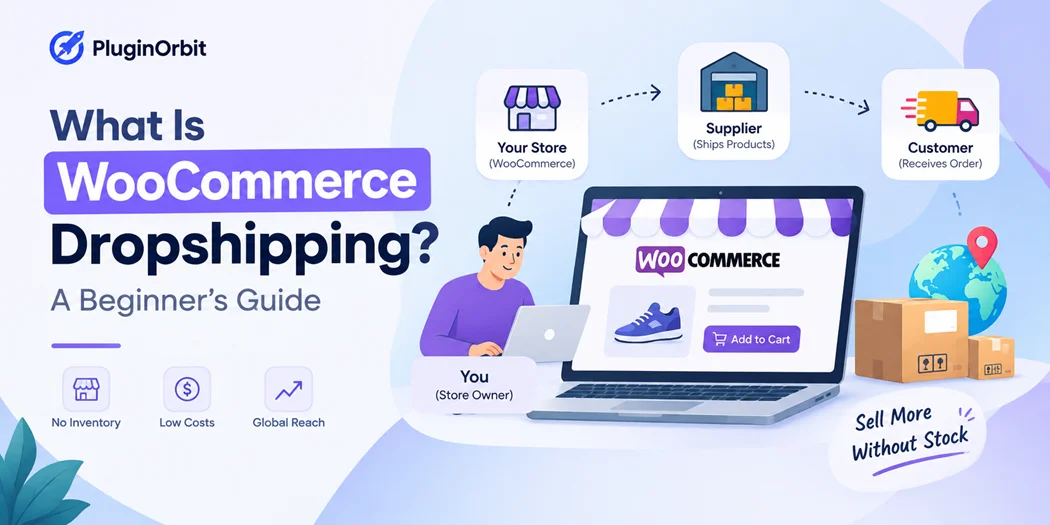
WooCommerce Dropshipping is an ecommerce business model that allows you to sell products online without keeping those products in your own inventory. Instead, a third-party supplier stores the products and ships them directly to your customers when an order is placed.
This model can make starting an online store easier because you do not need to purchase large quantities of inventory or manage your own warehouse. However, running a successful dropshipping store still requires product research, reliable suppliers, competitive pricing, customer service, and an effective website.
If you are considering dropshipping with WooCommerce, understanding how the model works, what you need to get started, and what challenges you may face can help you make better business decisions.
What Is WooCommerce Dropshipping?
WooCommerce Dropshipping is a way of running an online store where the retailer sells products without physically storing or fulfilling those products themselves.
Instead, the dropshipping business model separates selling from fulfillment. Your WooCommerce website handles the customer-facing side of the business, while the supplier generally manages inventory and shipping.
For example, imagine that you sell home accessories through your WooCommerce store. You list a product for $40, and a customer purchases it. You then send the order information to your supplier. The supplier prepares the product and ships it directly to the customer.
The customer purchases from your store, but the supplier handles the physical product fulfillment.
This means your main responsibilities include marketing, managing the website, communicating with customers, setting prices, handling orders, and managing the overall customer experience.
How Does WooCommerce Dropshipping Work?
The basic how WooCommerce dropshipping works process can be broken into several steps:
- Choose a product category and products to sell.
- Find reliable WooCommerce dropshipping suppliers.
- Create your WooCommerce store.
- Add products and pricing to your website.
- Promote your products to potential customers.
- A customer places an order through your store.
- The order information is sent to the supplier.
- The supplier prepares and ships the product.
- You manage customer communication and support.
The exact process depends on the supplier and the tools or integrations you use. Some suppliers provide automation for product imports, inventory updates, order processing, and shipping information.
The important point is that WooCommerce provides the online store infrastructure, while the supplier is responsible for much of the physical fulfillment process.
WooCommerce Dropshipping vs Traditional Ecommerce
The biggest difference between dropshipping and traditional ecommerce is inventory management.
In a traditional ecommerce business, you usually purchase products before selling them. You may need storage space, packaging materials, inventory tracking, and a fulfillment process.
With dropshipping, the supplier generally keeps the inventory until a customer places an order.
| Factor | Dropshipping | Traditional Ecommerce |
| Inventory | Usually held by supplier | Usually held by retailer |
| Storage | Generally not required | Usually required |
| Upfront inventory investment | Often lower | Often higher |
| Order fulfillment | Supplier usually handles it | Retailer or fulfillment service |
| Product control | More dependent on supplier | More direct control |
| Branding | May have limitations | Usually greater control |
Dropshipping can reduce inventory responsibilities, but it also means you have less direct control over product quality, packaging, and shipping.
What Do You Need to Start WooCommerce Dropshipping?
Starting a WooCommerce dropshipping store requires more than simply installing WooCommerce. You need a website, products, suppliers, payment methods, shipping arrangements, and a clear customer experience.
1. Domain and Hosting
You need a domain name for your store and reliable hosting for your WordPress website.
Your hosting should be capable of handling WooCommerce, product pages, customer traffic, payments, and other store functionality.
2. WordPress and WooCommerce
WooCommerce provides the core ecommerce functionality for your WordPress website. You can use it to create products, manage orders, configure checkout, accept payments, and manage shipping settings.
If you’re new to the platform, you can first understand what is WooCommerce before setting up your store.
3. WooCommerce Dropshipping Suppliers
Your supplier can have a major impact on the customer experience.
When evaluating WooCommerce dropshipping suppliers, consider:
- Product quality
- Wholesale pricing
- Inventory availability
- Processing time
- Shipping speed
- Shipping destinations
- Return policies
- Tracking availability
- Customer support
- Integration options
Do not choose a supplier based only on product price. A supplier with unreliable fulfillment can lead to delayed orders, refunds, negative reviews, and unhappy customers.
4. Products
Your product sourcing strategy should consider customer demand, competition, shipping requirements, product quality, and potential profit margins.
Research products before adding them to your store instead of choosing products simply because they are trending.
How to Start a WooCommerce Dropshipping Store
If you’re wondering how to start WooCommerce dropshipping, follow a structured process instead of adding dozens of products immediately.
Step 1: Select a Product Category
Choose a category with a clear target audience and products that are practical to sell online.
Research competitors and customer demand before making a decision.
Step 2: Research Suppliers
Compare several suppliers and check their product quality, pricing, processing times, shipping options, and return policies.
Ordering samples can also help you understand the actual quality of the products you plan to sell.
Step 3: Build Your WooCommerce Store
Install WordPress and WooCommerce, select a suitable theme, and create essential pages such as:
- Shop
- Product pages
- Cart
- Checkout
- Contact
- Shipping information
- Returns and refunds
- Privacy policy
- Terms and conditions
Step 4: Add Products
Create original product descriptions, upload clear images, set prices, and provide accurate product information.
Avoid simply copying descriptions supplied by your dropshipping provider. Original content can make your product pages more useful and differentiate your store from competitors.
Step 5: Configure Payments and Shipping
Set up payment methods and clearly explain shipping costs and delivery times.
Customers should understand when they can expect their orders and whether additional shipping charges apply.
Step 6: Test Your Store
Before launching, complete a test purchase.
Check the product page, cart, checkout, payment process, order confirmation, emails, mobile experience, and supplier fulfillment process.
A complete test helps identify problems before customers encounter them.
What Are the Benefits of WooCommerce Dropshipping?
There are several reasons businesses consider WooCommerce Dropshipping.
Lower Inventory Requirements
One of the main advantages is that you generally do not need to purchase large quantities of products before making sales.
This can reduce the amount of money tied up in physical inventory.
Less Storage
Because the supplier normally stores the products, you do not need to maintain your own warehouse for the products you sell.
Easier Product Testing
Dropshipping can allow you to test different products without purchasing large quantities of inventory upfront.
This can be useful when determining which products attract customers.
Flexible Store Management
A WooCommerce store can be managed online, allowing you to update products, monitor orders, manage content, and review store activity without operating a traditional retail location.
What Are the Challenges of WooCommerce Dropshipping?
Although WooCommerce Dropshipping can reduce some operational requirements, it is not a completely hands-off business model.
Supplier Dependence
Your store depends heavily on the supplier for product availability, quality, processing, and shipping.
If the supplier makes a mistake, customers may still hold your store responsible.
Product Quality
You may have less control over product quality than a retailer that physically handles its inventory.
This is why product samples and supplier research are important.
Shipping Problems
Shipping times and costs can vary significantly between suppliers.
If you work with multiple suppliers, products from one customer order may also arrive separately.
Competition and Margins
Many dropshipping businesses may sell similar products. Competition can make it difficult to maintain high margins.
Your calculations should include product costs, shipping, payment processing, advertising, refunds, taxes, and other expenses.
How Can You Reduce Abandoned Carts?
Driving visitors to your store is only one part of ecommerce. Some shoppers will add products to their cart and leave before completing the purchase.
A WooCommerce abandoned cart solution can help you create recovery workflows for eligible abandoned carts. PluginOrbit’s PO Abandoned Cart for WooCommerce supports features such as abandoned-cart tracking, automated recovery emails, and cart restoration.
For a WooCommerce dropshipping business, recovering potential customers can be an important part of improving the overall sales process.
Which WooCommerce Plugins Can a Dropshipping Store Use?
The right WooCommerce dropshipping plugins depend on your store’s specific requirements.
For example, you might need plugins for abandoned-cart recovery, checkout customization, product management, analytics, shipping, customer communication, or other ecommerce workflows.
Instead of installing too many plugins, identify the problems your store needs to solve first.
You can review PluginOrbit’s 10 Must-Have WooCommerce Plugins to explore different plugin categories and use cases.
The goal should be to create a reliable store rather than simply adding more functionality.
When Would a Dropshipping Store Need a Digital Signature?
A digital signature is not necessary for every dropshipping store. However, certain businesses may need customers to provide approval, consent, authorization, or other confirmation before an order is processed.
For example, stores selling customized products or services may require customer approval before production begins.
A WooCommerce digital signature can add a signature field to the checkout process for these types of workflows.
PluginOrbit’s Digital Signature for eCommerce Checkout supports features including draw-or-type signatures, consent options, signature storage, order-page access, and signature information in order emails and PDF invoices.
If you want to understand how these solutions work, our WooCommerce digital signature plugin guide explains common features and use cases.
Is WooCommerce Dropshipping Profitable?
There is no fixed answer to whether WooCommerce dropshipping will be profitable because results depend on your products, pricing, marketing costs, supplier expenses, customer acquisition, and operating costs.
A simple calculation can help estimate your potential margin:
Selling price − product cost − shipping − payment fees − advertising − other expenses = estimated profit
For example, if you sell a product for $40 and spend $18 on the product, $5 on shipping, $2 on payment-related costs, and $8 acquiring the customer, $7 remains before other business expenses.
This is why calculating your costs before launching advertising campaigns is important.
Is WooCommerce Dropshipping Good for Beginners?
For beginners, dropshipping with WooCommerce can provide a way to learn ecommerce without immediately managing a large physical inventory.
However, the business still requires work.
You need to understand product research, supplier management, pricing, marketing, customer service, shipping, returns, and basic ecommerce financial calculations.
The technical setup may be manageable, but building a sustainable store requires ongoing testing and optimization.
Conclusion
WooCommerce Dropshipping allows you to sell products online while relying on suppliers to manage inventory and product fulfillment. It can reduce the need for storage and upfront inventory, but it does not eliminate the work required to operate an ecommerce business.
The most important areas to focus on are product sourcing, supplier reliability, pricing, customer experience, shipping, marketing, and order management.
Start with a manageable product range, test your store before launch, calculate your actual costs, and choose tools based on genuine business requirements.
With the right setup and consistent optimization, WooCommerce can provide the foundation for building and managing a dropshipping store.