As online shopping continues to evolve, businesses are looking for easier and more secure ways to manage customer agreements, approvals, and signed documents. For WooCommerce store owners, adding a signature option can make checkout and order processes more convenient while reducing the need for paperwork.
However, many people are confused about the difference between a digital signature and an electronic signature. Although the terms are often used interchangeably, they are not exactly the same.
WooCommerce Digital vs Electronic Signature, how each type works, their key differences, and how you can use an electronic signature for WooCommerce to create a smoother customer experience. You can also explore top 5 woocommerce signature plugins to find a suitable solution for your store.
What Is an Electronic Signature?
An Electronic Signature is a broad term for information or an action used electronically to indicate a person’s intention to sign or approve something.
For example, a customer may type their name, draw a signature with their finger or mouse, click an agreement checkbox, or use another electronic method to confirm their acceptance.
Electronic signatures can be useful for:
- Customer agreements
- Order confirmations
- Waivers and consent forms
- Service agreements
- Product approvals
- Business contracts
- Online applications
- WooCommerce checkout processes
An electronic signature does not necessarily use encryption or a digital certificate. Its primary purpose is to provide an electronic way for someone to show their intent and agreement.
What Is a Digital Signature?
A digital signature is a more specific type of electronic signature that uses cryptographic technology to help verify the identity of the signer and protect the signed information from unauthorized changes.
Digital signatures commonly use a digital certificate and public-key cryptography. This can provide additional security and help demonstrate that a document has not been altered after signing.
For businesses handling important documents, digital signatures can provide additional authentication and document-integrity features.
This is why understanding digital signature vs electronic signature is important before choosing a solution for your WooCommerce store.
Digital Signature vs E-Signature: What’s the Difference?
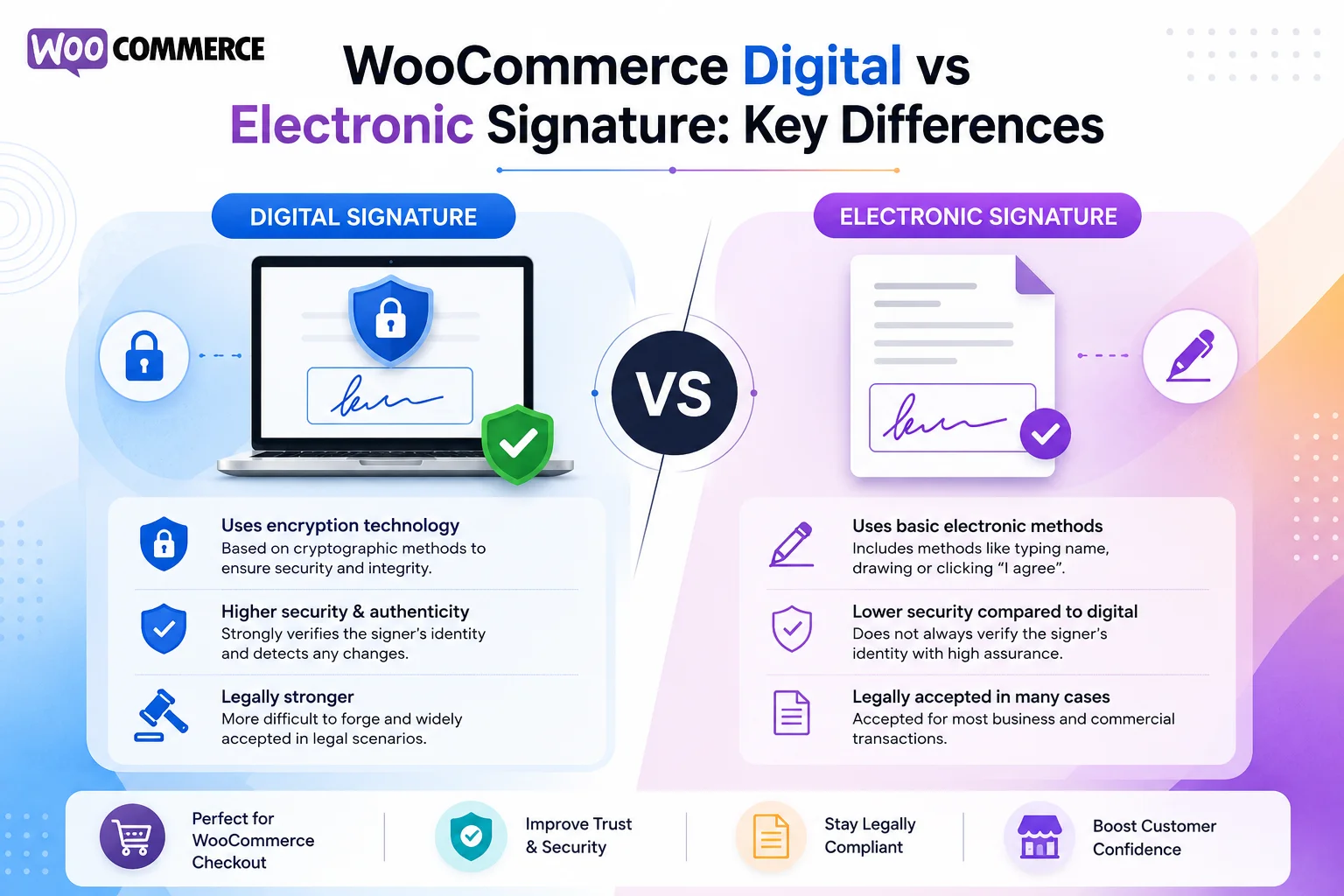
The terms Digital Signature vs E-Signature can be confusing because a digital signature is generally considered a type of electronic signature.
The main difference is the technology behind the signature.
An electronic signature can be as simple as typing a name or drawing a signature electronically. A digital signature generally uses cryptographic methods to verify the signer and protect the signed document. For businesses using a Digital Signature WooCommerce checkout, this can provide a convenient way to collect customer signatures during the purchasing process.
Here is a simple comparison:
| Feature | Electronic Signature | Digital Signature |
| Electronic signing | Yes | Yes |
| Typed or drawn signature | Often | May be supported depending on the solution |
| Authentication | Can vary | Typically stronger |
| Digital certificates | Not always required | Commonly used |
| Document integrity | Depends on the solution | Cryptographic protection |
| Typical use | Forms, agreements, approvals | More security-sensitive documents |
| WooCommerce use | Checkout, forms, agreements | Secure document-signing workflows |
In simple terms, electronic signature describes the broader concept, while a digital signature generally refers to a more technically secure method of signing electronically.
WooCommerce Digital vs Electronic Signature: Which One Should You Use?
Choosing between the two depends on what your WooCommerce store needs.
If you simply want customers to sign a form, agreement, waiver, or order-related document during an online transaction, an electronic signature solution may be sufficient.
For example, a WooCommerce store could ask customers to sign before completing an order that requires confirmation or acceptance of specific terms.
On the other hand, businesses that require stronger authentication, document integrity, or certificate-based signing may need a digital-signature solution.
The most important factor is not simply choosing between the two terms. You should look at the complete features offered by the plugin or service, including how signatures are collected, stored, associated with orders, and documented.
How Does an Electronic Signature for WooCommerce Work?
An electronic signature for WooCommerce can be added to a store through a suitable signature plugin or integration.
A typical workflow may look like this:
- The customer selects a product.
- The customer proceeds to checkout.
- A signature field is displayed when required.
- The customer signs electronically.
- The signature is associated with the order or agreement.
- The customer completes the purchase.
- The store retains the relevant order and signature information.
This process can remove the need to print, sign, scan, and email documents manually.
For stores that regularly require customer approval, this can make the overall ordering process considerably more convenient.
What Is an Electronic Signature Plugin?
An Electronic Signature plugin allows a WordPress or WooCommerce website to collect signatures electronically without requiring customers to leave the website.
Depending on the plugin, features may include:
- Signature fields
- Typed signatures
- Drawn signatures
- Required signatures
- Order-based signature collection
- Document or agreement signing
- Signature storage
- PDF or email integration
- WooCommerce compatibility
- Conditional signature requirements
Before installing an Electronic Signature plugin, check whether its features match your specific workflow.
For example, some plugins may focus primarily on forms, while others are designed specifically for WooCommerce orders and checkout.
Why Add a Signature to Your WooCommerce Store?
Adding a signature feature can provide several practical benefits.
1. Reduce Paperwork
Customers can complete the signing process online instead of downloading, printing, signing, scanning, and returning documents.
2. Improve the Customer Experience
A simple online signature process can make the purchasing journey more convenient, particularly when customers need to approve an agreement before completing an order.
3. Streamline Business Operations
Your team can manage orders and related signatures from the same online workflow instead of manually tracking signed paperwork.
4. Keep Information Organized
When signatures are connected to orders or customer records, it can be easier for businesses to locate the information they need.
5. Create a More Professional Workflow
A properly designed digital signing process can make a WooCommerce store feel more organized and professional.
Digital Signature WooCommerce Checkout: How It Can Help
A Digital Signature WooCommerce checkout workflow can be useful when a customer must sign before completing a purchase.
For example, a business could require a signature for:
- Customized products
- Personalized orders
- Service-related purchases
- Consent forms
- Waivers
- Special terms and conditions
- Products requiring customer approval
Instead of handling the signature separately through email, the store can incorporate it into the customer’s purchasing journey.
However, the signature should only be required when it is genuinely necessary. Adding unnecessary fields to checkout can create friction and potentially reduce conversions.
Choosing the Right WooCommerce Signature Solution
There are many factors to consider before choosing a signature solution for your store. pluginOrbit offers WooCommerce solutions designed to help store owners simplify their online workflows and improve the customer experience.
WooCommerce Compatibility
Make sure the plugin works properly with your WooCommerce setup and checkout process.
Ease of Use
Customers should be able to sign easily on desktop, tablet, and mobile devices.
Signature Storage
Check how signatures are stored and connected to orders or documents.
Security
Review the plugin’s security features and how customer information is handled.
Documentation and Audit Features
If your business needs a record of the signing process, look for features that provide appropriate documentation or audit information.
Integration Options
Consider whether the solution works with your existing forms, emails, PDFs, customer records, and other WordPress tools.
You can also explore our WooCommerce Digital Signature Plugin Guide for a more detailed look at adding signature functionality to a WooCommerce website.
WooCommerce Digital Signature vs Electronic Signature: Common Use Cases
Both approaches can be useful in different situations.
Online Agreements
Businesses can ask customers to electronically sign agreements before purchasing a service or product.
Customer Consent
A signature can provide an electronic record that a customer acknowledged specific information.
Customized Products
A store selling personalized products may request customer approval before production.
Service-Based Businesses
Businesses selling services through WooCommerce may require customers to agree to service terms before an order is completed.
Waivers and Approvals
Certain businesses may need customers to acknowledge specific terms before proceeding with an order.
The appropriate solution depends on the type of transaction and the level of security and documentation required.
Related WooCommerce Tools and Workflows
Signature functionality is often part of a larger WooCommerce workflow. Store owners may also use custom forms, product selectors, and submission-management tools to collect customer information.
For example, a Product Dropdown for Contact Form can help customers select a specific product when submitting an inquiry or request.
A WooCommerce Product Dropdown can also make product selection easier when customers need to complete a form before placing an order.
For businesses using Contact Form 7, managing Contact Form 7 Submissions can help organize customer inquiries and submit information alongside other website processes.
These tools can work together as part of a broader customer-information workflow, depending on the needs of your store.
How to Improve Your WooCommerce Signature Process
Simply installing a plugin is not enough. The signing experience should be easy for customers to understand.
Keep the Process Simple
Avoid asking customers to complete unnecessary steps. If a signature is required, clearly explain why.
Make It Mobile-Friendly
Many customers shop from smartphones. Your signature field should work comfortably on smaller screens.
Explain What the Customer Is Signing
Customers should be able to understand the agreement or information associated with the signature before submitting it.
Test the Complete Checkout
Test the process from beginning to end, including signing, payment, order creation, emails, and record storage.
Keep Your Plugin Updated
Use a reputable plugin and keep WordPress, WooCommerce, and related extensions updated to reduce compatibility and security problems.
Are Digital and Electronic Signatures Legally the Same?
Not necessarily. The legal treatment of electronic signatures can depend on the country, transaction, document type, and circumstances.
For U.S. businesses, electronic-signature laws can include federal and state requirements. A plugin by itself does not automatically make every transaction legally enforceable.
If legal enforceability is important to your business, consider the specific requirements that apply to your transactions and obtain appropriate legal advice.
The goal should be to choose a signing workflow that provides the level of authentication, consent, recordkeeping, and security your particular business requires.
Conclusion
WooCommerce Digital vs Electronic Signature makes it easier to choose the right signing workflow for your online store. While electronic signatures provide a broad way to capture customer agreement digitally, digital signatures generally use additional cryptographic technology for authentication and document integrity.
You can also connect your WooCommerce signature process with forms and customer submissions. Contact Form 7 Submissions can help you manage submitted customer information alongside your signature workflow.
For many WooCommerce businesses, the most important considerations are ease of use, security, integration, recordkeeping, and the specific requirements of the transaction.
Before choosing an Electronic Signature plugin, consider how customers will sign, where the signature will be stored, how it will connect to an order, and what documentation your business needs.