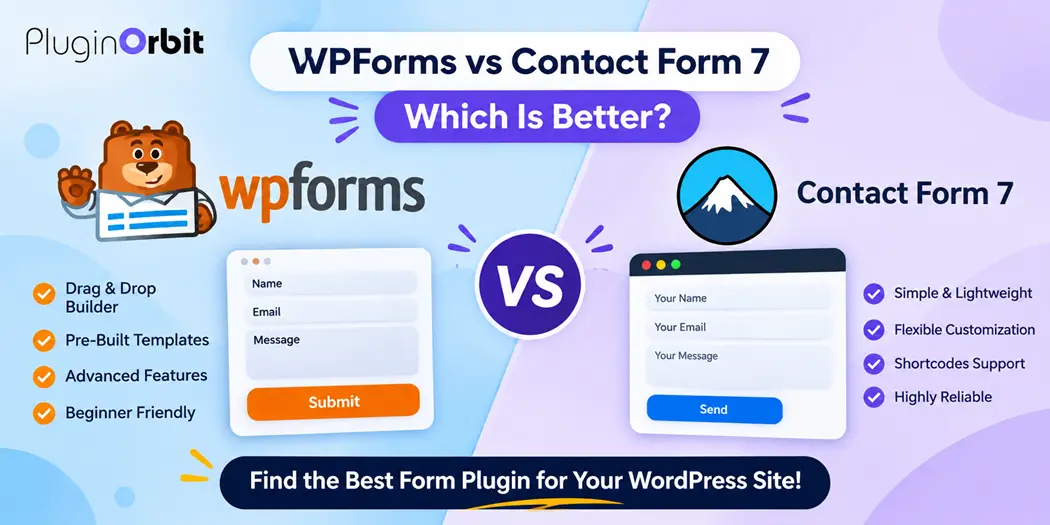
Choosing a WordPress form plugin depends on how you want to create forms, manage submissions, and collect information from website visitors. WPForms and Contact Form 7 are two popular options, but they take different approaches to form creation and management.
WPForms offers a visual drag-and-drop form builder, while Contact Form 7 uses a tag-based editor that gives users more control over form configuration. Both plugins support basic contact forms, and Contact Form 7 users can extend product selection functionality with the Product Dropdown Selector for Contact Form 7.
WPForms is generally a better choice for beginners and businesses that want a visual form-building experience. Contact Form 7 is a practical option for users who prefer a free, lightweight plugin and are comfortable configuring forms manually.
WPForms vs Contact Form 7 features, pricing, ease of use, customization, submission management, and pros and cons to help you choose the right plugin for your website.
WPForms vs Contact Form 7: Quick Comparison
Before looking at individual features, here’s how the two plugins compare across important areas.
| Feature | WPForms | Contact Form 7 |
| Form builder | Visual drag-and-drop builder | Tag-based editor |
| Ease of use | Beginner-friendly | Requires more manual configuration |
| Basic contact forms | Yes | Yes |
| Form templates | Available | Basic default form structure |
| Customization | Visual controls and field settings | Form tags, HTML, and CSS |
| Conditional logic | Available in supported paid plans | Requires additional functionality |
| Form submissions | Entry management in supported paid plans | Requires a separate storage solution |
| Spam protection | Multiple built-in options | Supported integrations and spam controls |
| Integrations | Native integrations and addons | Integrations and third-party extensions |
| Pricing | Free and paid plans | Free |
The main difference is the form-building experience. WPForms focuses on visual editing and additional functionality, whereas Contact Form 7 provides a straightforward way to create forms without purchasing a premium license.
What Is WPForms?
WPForms is a WordPress form builder that allows users to create contact forms, registration forms, feedback forms, payment forms, and other types of website forms.
Its drag-and-drop interface lets you add fields, rearrange their order, and configure form settings without manually writing form tags. Users can also start with available templates instead of building every form from scratch.
WPForms offers a free version called WPForms Lite and several paid plans that unlock additional functionality.
Some of its main features include:
- Visual drag-and-drop form builder.
- Prebuilt form templates.
- Customizable form fields.
- Form notifications and confirmations.
- Spam protection options.
- Payment integrations.
- Conditional logic in supported plans.
- Submission management in supported paid plans.
WPForms is particularly useful for website owners who want to create and manage forms without spending time configuring HTML or individual form tags.
What Is Contact Form 7?
Contact Form 7 is a free WordPress plugin for creating and managing contact forms. It uses a tag-based editing interface where users configure fields such as names, email addresses, messages, checkboxes, and dropdown menus.
Instead of arranging fields through a visual builder, users work with form tags and can customize the form’s HTML structure and styling.
Contact Form 7 supports features such as:
- Text and email fields.
- Dropdown menus and checkboxes.
- Radio buttons.
- File uploads.
- Date fields.
- Acceptance checkboxes.
- Email notifications.
- reCAPTCHA and other spam-related integrations.
- External API integrations.
One important limitation is that Contact Form 7 does not store submitted messages in the WordPress database by default. Users who need searchable submission records can add a solution such as Flamingo or another compatible storage plugin.
Contact Form 7 is suitable for users who want a straightforward contact form and prefer managing its structure manually.
WPForms vs Contact Form 7: Key Differences
Understanding the WPForms vs Contact Form 7 differences helps you choose a plugin based on your actual requirements rather than the number of features each one advertises.
1. Form Builder and Ease of Use
The form builder is one of the biggest differences between these plugins.
WPForms provides a visual drag-and-drop interface. You can select a field, add it to your form, change its settings, and rearrange fields without editing code.
For example, if you want to create a customer inquiry form, you can add name, email, subject, and message fields through the builder.
Contact Form 7 uses a different approach. You select form tags and place them inside the form template. You may also need to update the corresponding mail template to ensure submitted information appears in notification emails.
This approach provides flexibility, but beginners may need more time to understand how the form tags work.
Which is better?
WPForms is generally easier for beginners who prefer visual editing. Contact Form 7 is more suitable for users comfortable working with form tags and HTML.
2. Form Features and Customization
When comparing WPForms vs Contact Form 7 features, consider the type of forms you want to create.
WPForms offers different field types, templates, conditional logic, and additional functionality through its paid plans and integrations.
For example, a business can use conditional logic to display additional questions based on a visitor’s previous selection.
Contact Form 7 supports common form fields, file uploads, dropdown menus, and acceptance checkboxes. Users can also customize the form structure using HTML and CSS.
However, advanced functionality may require additional plugins or custom development.
Which is better?
WPForms is a stronger option for users who want built-in visual controls and advanced form-building features. Contact Form 7 works well for basic forms and custom configurations.
3. Form Templates and Field Options
Prebuilt templates can reduce the time required to create forms.
WPForms provides templates for different purposes, including contact forms, newsletter signups, feedback forms, and business inquiries. Template availability depends on the plan.
Contact Form 7 provides a basic form structure that users can modify by adding or removing form tags.
For example, a business creating a quote request form may need fields for customer details, product selection, quantity, and additional requirements.
WPForms makes this process more visual, while Contact Form 7 requires users to configure the fields manually.
Which is better?
WPForms is more convenient when you want to start with a template. Contact Form 7 offers a simpler starting point for users who prefer building forms manually.
4. Form Submission Management
Creating a contact form is only one part of collecting information. You also need a reliable way to access and manage the submitted data.
WPForms provides entry management through its supported paid plans. Users can view and manage form entries from the WordPress dashboard.
Contact Form 7 sends submitted information through configured email notifications but does not include native database storage for submissions.
If you want to keep a searchable record of submitted messages, you need an additional solution.
For example, you can use a compatible storage plugin to manage Contact Form 7 entries from your WordPress dashboard.
You can also save Contact Form 7 submissions using a dedicated database storage solution.
Which is better?
WPForms offers a more integrated submission management experience through its supported plans. Contact Form 7 can also support submission storage, but it requires an additional plugin.
5. Form Styling and Customization
A contact form should match your website’s design and provide a consistent experience across desktop and mobile devices.
WPForms offers visual styling options that help users customize form layouts, field appearance, and other design elements.
Contact Form 7 allows users to customize forms using HTML and CSS. This gives developers more direct control over the form’s appearance, but users without coding knowledge may find the process less convenient.
If you use Contact Form 7, you can explore Styling Contact Form 7 to customize fields, buttons, spacing, and form layouts.
Which is better?
WPForms is easier for users who prefer visual customization. Contact Form 7 offers flexibility for users comfortable editing CSS and HTML.
6. Spam Protection and Security
Spam submissions can create unnecessary work for website owners and make it harder to identify genuine inquiries.
WPForms provides built-in anti-spam functionality and supports additional CAPTCHA and spam protection options, depending on the configuration and plan.
Contact Form 7 supports spam protection integrations such as reCAPTCHA, Akismet, and Cloudflare Turnstile.
Both plugins can help reduce unwanted submissions, but no form plugin can guarantee that every spam submission will be blocked.
Choose appropriate protection, keep plugins updated, and avoid collecting unnecessary personal information.
Which is better?
Both offer spam protection options. WPForms provides a more integrated collection of controls, while Contact Form 7 allows users to configure supported integrations.
7. Integrations and Additional Functionality
Integrations become important when you want to form submissions to connect with other business tools.
WPForms offers integrations and addons for email marketing, payments, automation, and other services. Availability depends on the selected license.
Contact Form 7 supports selected integrations and can connect with additional services through compatible extensions or custom API configurations.
For example, a business may want to connect its inquiry form with an email marketing platform or send customer information to another application.
Which is better?
WPForms is generally more convenient for users who want a managed integration ecosystem. Contact Form 7 offers flexibility for developers who are comfortable working with additional extensions and APIs.
WPForms vs Contact Form 7: Pricing
Pricing is another important factor when choosing a WordPress form plugin.
Contact Form 7 is free to download and use. It does not have a premium license or paid feature tiers.
WPForms offers both a free version and paid plans. WPForms Lite supports basic form creation, while paid plans unlock additional functionality such as advanced fields, conditional logic, entry management, and integrations.
Before choosing a paid plan, check whether its features match your website’s requirements.
For example:
- Choose WPForms Lite if you need basic forms and a visual builder.
- Consider a paid WPForms plan if you need advanced form functionality and entry management.
- Choose Contact Form 7 if you want a free plugin and are comfortable configuring forms manually.
The cheapest option is not always the most practical. Consider the additional plugins, development time, and maintenance required to achieve your desired functionality.
WPForms vs Contact Form 7: Pros and Cons
Both plugins have advantages and limitations. The right choice depends on your technical experience, budget, and form requirements.
WPForms Pros and Cons
Pros
- Beginner-friendly drag-and-drop form builder.
- Prebuilt templates for different form types.
- Visual form customization.
- Advanced functionality through paid plans.
- Multiple spam protection options.
- Submission management in supported plans.
Cons
- Some advanced features require a paid license.
- Pricing can be a consideration for smaller websites.
- Certain integrations and features depend on the selected plan.
Contact Form 7 Pros and Cons
Pros
- Free and open-source plugin.
- Supports common contact form fields.
- Allows HTML and CSS customization.
- Supports useful integrations.
- Suitable for basic contact forms.
- Gives developers control over form configuration.
Cons
- No native drag-and-drop form builder.
- Requires manual form-tag configuration.
- Does not store submissions in the WordPress database by default.
- Advanced features may require additional plugins.
- Styling can require CSS knowledge.
Which Plugin Should You Choose?
The best plugin depends on how you plan to use forms on your website.
Choose WPForms if:
- You want to create forms without writing code.
- You prefer a visual drag-and-drop builder.
- You need ready-made templates.
- You want integrated entry management through a supported plan.
- You plan to use advanced form features and integrations.
Choose Contact Form 7 if:
- You want a free contact form plugin.
- You mainly need basic inquiry forms.
- You are comfortable working with HTML and form tags.
- You want to customize forms using CSS.
- You are comfortable installing additional plugins for specific requirements.
For most beginners and small businesses that value convenience, WPForms is the easier starting point. However, Contact Form 7 remains a practical option for developers and website owners who need basic forms without a premium license.
Before making your decision, consider how many forms you need, whether you must store submissions, and which integrations are essential to your workflow.
If you are building a WordPress website, you can also create a contact form based on the information you need to collect from visitors.