Go to WooCommerce > Cart Recovery > Settings. This is where you control when and how recovery emails go out.
Adding a Rule
By default, the plugin ships with example rules (e.g. a first reminder after 1 hour, a second after 24 hours). Each rule has four parts:
- Enabled — turn this specific rule on/off without deleting it
- Label — an internal name so you can identify it in the Email Log (e.g. “First reminder”)
- Send After (hours) — how long to wait after the cart was abandoned before this email goes out
- Subject Line — the email subject the customer sees
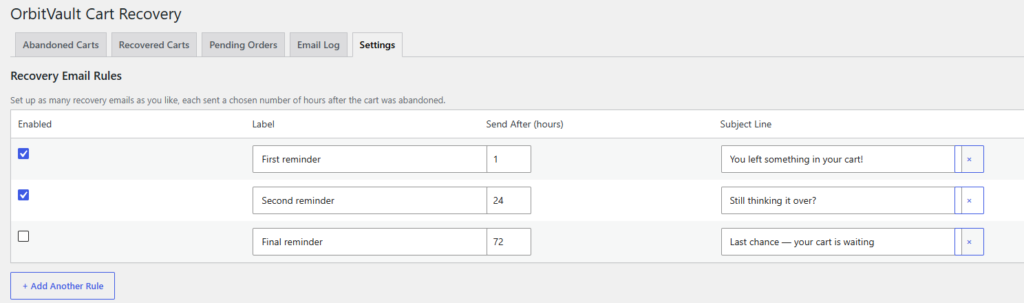
To add another rule, click + Add Another Rule and fill in the new row. To remove one, click the × button on that row.
Click Save Settings at the bottom of the page when you’re done.
Tip: Stagger your rules for example 1 hour, 24 hours, and 72
hours rather than sending multiple emails close together.


