Requirements
- WordPress 5.5 or later
- WooCommerce (active and set up with a Checkout page)
- PHP 7.0 or later
Installing from a ZIP file
- Go to Plugins → Add New → Upload Plugin in your WordPress admin.
- Choose the plugin ZIP file you downloaded and click Install Now.
- Once installed, click Activate Plugin.

After activation
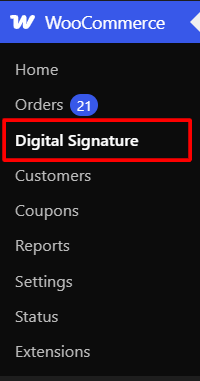
A new menu item appears under WooCommerce → Digital Signature. Open it to configure the pad before your customers see it at checkout.
Note: If you also use the Pro version, only one of the two (Free or Pro) should be active at a time activating both together will show an error, since they share the same underlying functionality.


